Enrolling in and Withdrawing from a Moodle Course – How to Enroll and Withdraw
Moodle courses are at the heart of every Learning Management System. To ensure that learners can access the appropriate content at any time, they must first be enrolled in a course. It may also be useful to unenroll from a course—for example, when a training program has been completed or if the wrong course was selected by mistake.
In this post, you'll learn how enrollment and unenrollment work in Moodle, what the differences are between the various enrollment methods, and how unenrollment affects your learning progress and grades.
Topics covered in this post
- Good to Know
- Enroll in a Moodle course (sign up)
- Leaving a Moodle Course (Unenrolling)
- Log out, lock, or delete—what's the difference?
- Frequently Asked Questions (FAQ)
- Conclusion
Good to Know
Generally, auser account in Moodle only becomes a participant once theuser enrolls in a course. Upon enrollment, the account is assigned a role in the course—for example, participant or instructor. Outside of courses, the account is simply logged into the system as an authenticated user. Roles such as participant or instructor are always valid only within the respective course.
The only exceptions are system-wide roles (e.g., administrator, manager, or globally assigned roles).
Enroll in a Moodle course (sign up)
How you can enroll in a Moodle course depends on how the course instructor (course coordinator) typically sets up the enrollment methods for the course. The administrator enables the enrollment methods available in courses system-wide. Not every enrollment method allows for self-enrollment.
Self-registration by participants
Prerequisite:
- Self-enrollment is enabled for this course.
- An enrollment key may be required.
Here's how registration works:
- Open the course you want.
- Select "Register" or "Enroll."
- If necessary, enter the registration key.
- Confirm your registration.
Once you have successfully enrolled, the course will be available immediately.
Other Standard Moodle Enrollment Methods
In addition to self-enrollment, Moodle offers other enrollment methods by default. Numerous other methods are available as plugins, for example, through the Moodle Marketplace (formerly the Moodle Plugin Directory).
Manual Enrollment
Instructors or administrators enroll participants directly in the course. This method is particularly suitable for closed courses or mandatory training sessions.
Global Group
Participants are automatically enrolled via a global group (system-level group). User accounts newly added to the global group are automatically enrolled in the corresponding courses.
External Enrollment
In corporate environments, course enrollment is often automated using external sources such as LDAP/Active Directory (enrol/ldap), external databases or HR systems (enrol/database or via web service push) as well as through global groups (cohort synchronization).
Single sign-on (SAML2, OAuth2, CAS) only handles login to Moodle; course membership is additionally managed using the methods mentioned.
Guest Access
With guest access, people can view a course without being permanently enrolled. Depending on the configuration, access may be open to anyone or protected by a guest password.
Since no registration is required, learning progress, assessments, or activity logs are generally not saved. Guest access is therefore best suited for freely accessible information or preview courses.
Meta Enrollment
With meta-enrollment, courses automatically import participants from another Moodle course. Anyone enrolled in the source course will thereby also gain access to the linked course.
This method is particularly suitable when multiple courses have the same target audience and you do not want to have to manage the participants multiple times.
Registration through a course section
In some Moodle installations, users are automatically enrolled in all courses within a specific course area. Administration is handled centrally at the course area level, rather than within individual courses.
This enrollment method simplifies administration when many courses are offered to the same target group and all eligible participants are to be granted access automatically.
Leaving a Moodle Course (Unenrolling)
Basic Principle
In Moodle, leaving a course is referred to as "unenrollment "—as opposed to deleting a user account. Unenrollment removes the participant from the course; the account remains active, and the person can re-enroll (provided the enrollment method allows it).
Whether participants are allowed to drop a course on their own depends on the enrollment method and the configured permissions.
Can participants cancel their registration on their own?
Whether you can drop a course on your own depends on the enrollment method you used.
Available for:
- Self-Enrollment (Standard)
- manual enrollment, provided that the appropriate permissions have been enabled
Not available for:
- Global Groups (Cohort Synchronization)
- Guest Access
- LDAP Registration
- Database Registration
- other externally managed enrollment methods
In these cases, enrollment is controlled by a higher-level system.
How to Drop Out of a Course
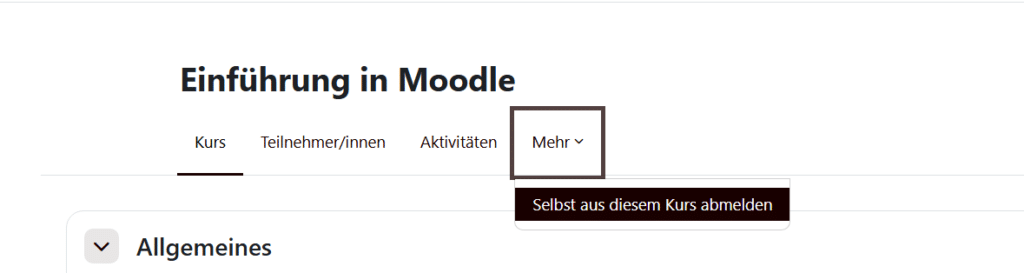
If self-deregistration is permitted:
- Open the course.
- Select " More."
- Click "Unenroll from the course" (the label may vary slightly depending on the Moodle version).
- Confirm your logout.
Unsubscription by a coach or administrator
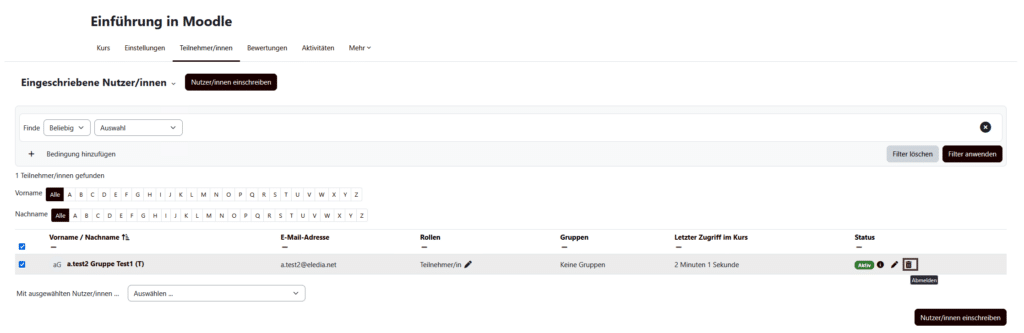
Instructors can manually remove participants from a course at any time.
- Open the course to participants.
- Select the person you want (or select multiple people at once and log them out together).
- Use the action menu to deactivate individual users by clicking the"trash can"icon, or deactivate multiple user accounts using the"Delete manual or self-registration"action.
Administrators can also disable entire enrollment methods, thereby removing all students enrolled through those methods from the course at the same time.
Automatic Logout of Inactive Participants
When using self-enrollment, automatic deregistration can be set up or enabled.
When enrolling manually, you can also specify the duration of participation. Once this period expires, participants are automatically removed from the course.
About the Setting Unsubscribe inactive users after (Unenrol inactive after) Moodle automatically removes participants from a course if they have not accessed it for a specified period of time.
This keeps participant lists up to date, and course accesses that are no longer needed are automatically removed.
Consequences of Canceling Registration
- By default, that person will no longer appear in the list of participants or in the evaluation summary.
- Activity evaluations and submissions remain in the database and will be visible again upon re-enrollment.
- Group assignments and roles in the course will be lost and may need to be reset when students re-enroll.
- Earned badges remain in the user's profile.
Log out, lock, or delete—what's the difference?
These terms are often confused, but they have different implications.
| Promotion | Result |
| Unenroll | Course access ends, but learning data is retained. |
| Block Registration | Access will be disabled, but enrollment will remain active. |
| Suspend User Account (User) | Access to Moodle will be blocked. Learning data and course enrollments will be retained. |
| Delete User Account (User) | The entire Moodle account will be deleted system-wide. |
Frequently Asked Questions (FAQ)
Are grades lost when someone drops a course?
No. Grades, submissions, and test results remain stored in Moodle and can be reused if the student re-enrolls at a later date.
Why can't I unenroll myself from the course?
Possible reasons include:
– Enrollment is handled through a cohort or an external system.
– The required permission to unenroll yourself has been disabled.
– The course is hidden from participants.
– The Moodle administrator has intentionally disabled self-enrollment.
Can I re-enroll after dropping a course?
Yes, provided that the enrollment method used allows it. With self-enrollment, this is usually possible without any problems. However, if enrollment is managed centrally through a cohort or an external administrative system, re-enrollment must be processed through that system.
Conclusion
Enrollment and unenrollment are among Moodle’s basic functions. While learners can often enroll and unenroll themselves through self-enrollment, many courses in corporate settings are managed centrally by administrators or through external systems. Unenrollment simply removes access to the course—grades, submissions, and other learning data are retained and can be reused if the learner re-enrolls at a later date.