
Moodle MCP Plugin – Connect AI Assistants Securely to Moodle
The eLeDia MCP plugin connects Moodle to modern AI assistants via the Model Context Protocol (MCP)—securely, flexibly, and in compliance with data protection regulations.
With the eLeDia.ai | MCP Connector plugin, AI assistants like Claude can access your Moodle instance directly and in a rights-based manner. The connector natively integrates the Model Context Protocol (MCP) into Moodle: AI models can then create courses, manage users, or search through content—all within the permissions, roles, and access settings you’ve already defined in Moodle. Every action is logged, and critical steps require confirmation—controlled, auditable, and open source.
Here you will find the following topics
The Problem and the Solution
Moodle's admin interface is complex
The Problem
Moodle’s raw web service interface is powerful, but unsuitable for AI agents: hundreds of functions, inconsistent data formats, unstable across versions—and a security risk if opened carelessly. Anyone who wants to connect an AI assistant to Moodle faces the choice of either doing a lot of integration work or opening it up to a dangerous extent.
Admins need an intuitive interface
The Solution
The eLeDia MCP Web Service implements MCP as a Moodle web service protocol and, instead of the raw interface, provides a curated set of stable, denormalized, LLM-friendly tools. Compatible clients—such as the eLeDia.ai Tutor, as well as Claude Desktop, Cursor, Windsurf, and Langflow—communicate with Moodle via a single standard interface. And each tool runs as the authenticated user: it can never access data that the user is not already authorized to view.
MCP Connector for Moodle with rights-based, auditable AI access
Overview of the plugin's features
AI Actions Become Moodle Actions
The eLeDia.ai | MCP Connector makes Moodle accessible via the Model Context Protocol without bypassing the existing permissions and roles logic. Every request from the AI model is executed as a regular Moodle web service function with the same permission checks that apply to other interfaces.
What the eLeDia.ai | MCP Connector Does
The connector provides about 20 tools that allow AI assistants to access Moodle in a structured way. For example, it can:
- Search for, Create, and Manage Courses
- Search for users and retrieve contextual information
- Browse course content
- Secure critical actions with two-step verification
- Log every action in the Moodle event log
- Limit requests using configurable rate limiting
- Immediately disable access via a central kill switch
All features can be configured through the Moodle administration interface and can be restricted on an institutional basis.
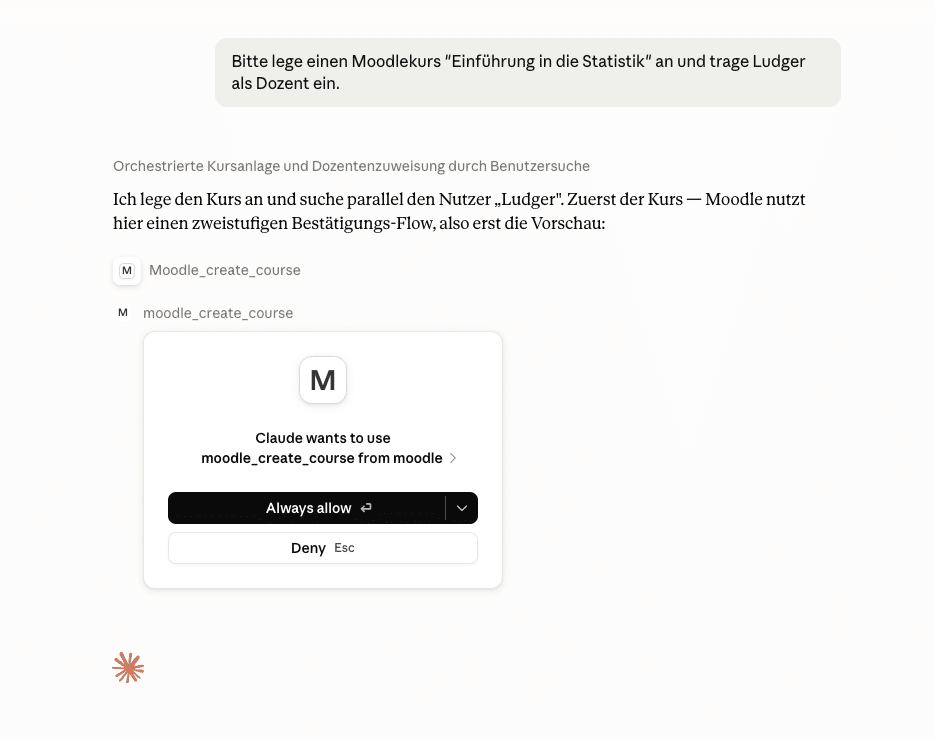
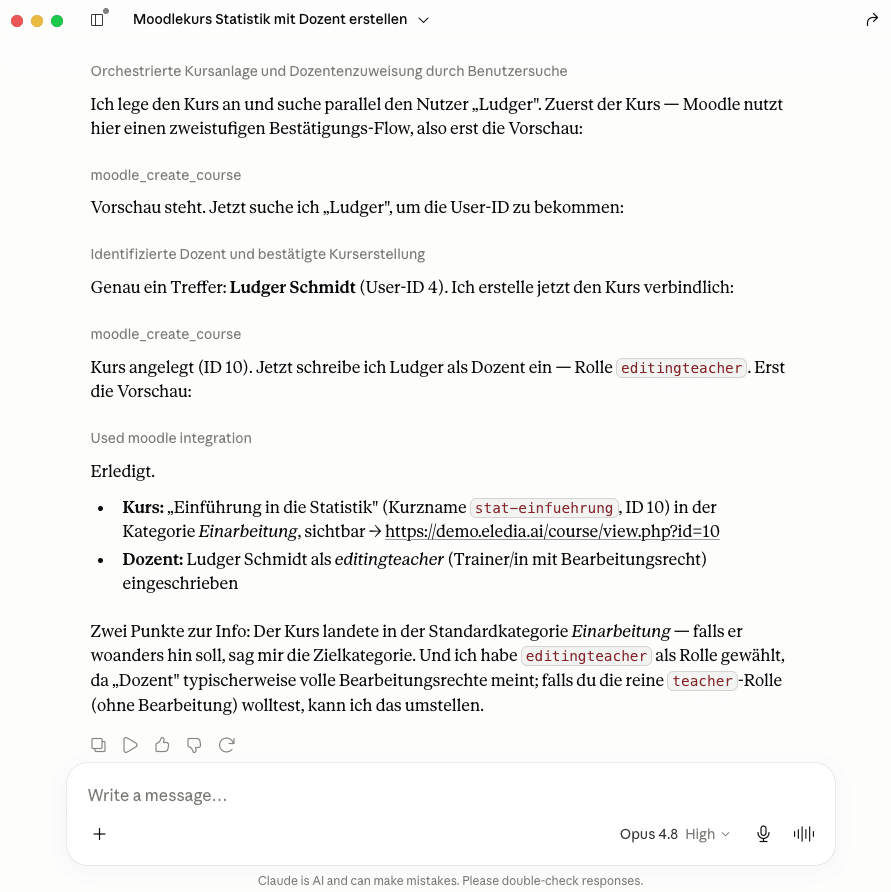
Moodle permissions are retained
A key component of the connector is the consistent enforcement of Moodle access rights. An AI model is granted access only to those functions and data for which the underlying user context would also be authorized in Moodle itself.
This means that there is no access “bypassing Moodle.” Roles, capabilities, and course access rights remain the primary means of control—even if the request comes from an AI assistant.
Security & Governance
Security is the core concept, not an afterthought. Every request enforces capability, enrollment, and visibility checks. In addition, there is origin validation, a CORS allow list, an optional (disabled by default) query string token, rate limiting, request size limits, and an emergency shutdown. Comprehensive audit logging of Moodle events records every relevant action (tool_invoked, write_performed, context_verified, token_created, token_revoked).
Write-in campaigns only with confirmation
Sending messages, creating users or courses, updating courses, enrolling students—any actions that involve editing require explicit two-step confirmation and the appropriate Moodle capability. This means the assistant cannot make any changes without being noticed.
Features of the eLeDia.ai | MCP Connector
Available directly in Moodle
The connector runs as a native PHP web service plugin—no external server, no additional components outside of Moodle.
Confirmation Before Critical Actions
Actions that affect data (e.g., creating a course, assigning users) go through a two-step confirmation process before they are executed.
Integrated into eLeDia.ai | Tutor
The connector is seamlessly integrated into eLeDia.ai | Tutor. All actions are controlled via the chat window in Moodle.
Open Source and Verifiable
The connector is released under the GPLv3+. The source code, feature set, and security mechanisms are fully transparent.
Model-independent
The connector is not tied to any specific AI model. It works with Claude and other MCP-compatible assistants.
Quick Setup
Installation and configuration are the same as for any other Moodle plugin—via the standard plugin management interface and the web service settings
The MCP Connector is vendor-neutral, so it works with all AI tools that can use MCP.
Focus on Digital Sovereignty
The eLeDia.ai | MCP Connector was developed for Moodle environments where data protection, control, and traceability are key requirements. Since the connector runs natively within Moodle, there is no additional data routing through external servers. AI access is subject to bearer token authentication, CORS validation, and configurable rate limiting. Critical actions require explicit confirmation, all actions are logged via the Moodle Events API, and a central kill switch allows for the immediate deactivation of AI access.
This allows the use of AI assistants in Moodle to be designed in a way that meets the three key criteria for digital sovereignty:
- Transparency – What Data Is Processed and Where
- Controllability – who determines what the AI is allowed to do and can change this at any time
- Traceability – whether every action can be verified retroactively
The eLeDia.ai MCP Connector consists of a native Moodle web service plugin (webservice_elediamcp), which provides the Model Context Protocol via JSON-RPC.
Requests from AI assistants or from eLeDia.ai | Chat are executed as regular Moodle External Functions and undergo the same capability check as other web service calls. The connector manages approximately 20 tools that can be enabled or restricted via the Moodle administration interface. Bearer token authentication and CORS validation secure the interface, while configurable rate limiting restricts the frequency of calls. Critical, data-modifying actions undergo a two-step confirmation process. Every action performed is logged via the Moodle Events API and can thus be tracked in the instance’s regular event log. A central kill switch allows for the immediate deactivation of all AI access.
The connector is released as an open-source plugin under the GPLv3+ license.

Discuss options for using AI in your organization
The eLeDia.ai | MCP Connector is available as an open-source solution and is currently labeled as a “beta version.” We are continuously working on its further development through various projects, taking customer ideas and requirements into account. Would you like to continue working with us on integrating AI into your educational organization?
Then please feel free to contact us!