Where automation makes sense—and where people make the decisions.
How much AI should an LMS have?
AI in education opens up new possibilities for designing smarter learning platforms and providing targeted support to both teachers and learners. However, the added value does not come from automating as many tasks as possible. What matters most is which tasks the AI takes on, how autonomously it acts, and where humans retain control. Especially in systems like Moodle, clear criteria are therefore needed to ensure that AI is used in a pedagogically sound and responsible manner.
We are evolving Moodle into an AI-First LMS. Does “AI-First” mean that AI will do everything in the future? In this post, Dr. Johannes Moskaliuk presents a model that helps evaluate the pedagogically sound use of AI. Johannes Moskaliuk presented the model at the Moodle Moot Europe 2026 in Barcelona, along with an overview of the current status of the eLeDia.a | Suite.
The overarching goal is for AI to free up time for work that only humans can do. That sounds simple. The difficult question is: Where is AI allowed to be used, and for what purposes? To address this , we’ve developed a model and tested it on our own products.
Three Questions for Every AI Application
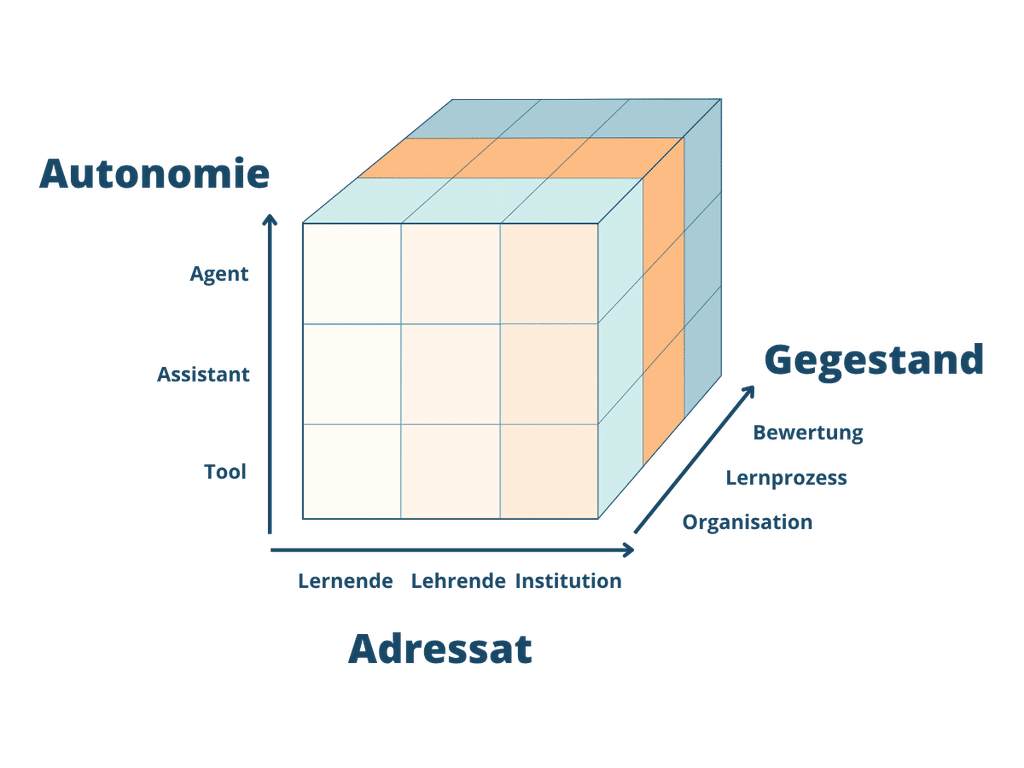
There are already taxonomies for AI in education, such as the four application areas identified by Zawacki-Richter et al. (2019) or the classification by Baker and Smith (2019) based on applications for learners, teachers, and the system. While they describe the field well, they offer little guidance on what specific features should be enabled in a particular Learning Management System . Our model therefore poses three questions for every AI application:
- Intended Audience: Who does this initiative serve? Learners, teachers, or the institution? This three-part classification was developed by Baker and Smith (2019), refined by Holmes and Tuomi (2022), and adopted by the OECD (2024).
- Degree of Autonomy: Who controls the process? A continuum ranging from tools to assistance to agents. With tools, humans initiate every action. With assistance, the AI makes suggestions and humans approve them. With agents, the AI controls the process itself, while humans oversee it. This classification is based on Molenaar’s (2022) levels of automation.
- Subject: What is being addressed? The organization of learning, the learning process itself, or assessment?
Every specific application of AI is thus a point in a three-dimensional space. Johannes emphasizes an important distinction here: it is the application that is classified, not the product. Depending on its configuration or specific use, the same tool can occupy very different positions within the cube.
Autonomy follows the object
What does this mean for AI First? The key rule is this: The level of autonomy granted to AI depends on the subject matter. This gives rise to three areas.
| Subject | What AI Does | Space for People |
|---|---|---|
| Organization | Responsibilities as an agent: Course registration, enrollment, deadlines | Less administrative work |
| Learning Process | Prepare as an assistant to help people create: designs, tutoring, evaluations | Time for Support and Conversation |
| Rating | No AI Decisions: Grades, Exams, and Admissions Remain in Human Hands | Time for a well-informed judgment |
This frees up more time. Those who spend less time on enrollment forms have more time to support students. And those who provide better support to students are ultimately better able to evaluate them accurately.
This is consistent with the logic of the EU AI Act. Annex III classifies education systems as high-risk if they make decisions regarding access, admission, or the assessment of learning outcomes. The decisive factor here is the purpose—that is, the subject matter—rather than the technology behind it.
For us, “AI First” therefore means: AI to the extent that the subject matter allows.
Three Real-World Examples
Three examples from the eLeDia.ai | Suite illustrate how this works in practice.
1.) Course Creation via MCP. Instructor, Organization, Agent. Imagine you’re preparing a new course for a group. Until now, that meant: creating the course, setting up sections, scheduling dates, enrolling participants—one form after another. With the MCP Connector, you describe the course in just a few sentences. The AI creates it in Moodle, with the exact permissions of the registered user, and shows you a preview for approval. The result: more time for instructional design.
2.) eLeDia.ai Tutor with feedback. Students and instructors, learning process, assistance. Students are often left on their own with their questions or have to wait for the next office hours. Instructors often don’t realize students are having trouble understanding the material until the exam. The eLeDia.ai Tutor supports students at any time based on the course content. Its feedback shows instructors where students are struggling. The benefit: targeted support exactly where it’s needed.
3.) Learning Briefing. Learners, organization, support staff. Learners work together to find out what’s on their plate by checking courses, forums, and emails. The briefing provides them with a personalized overview: deadlines, pending tasks, new messages, and a suggestion for the next step. The suggestion is just that—a suggestion; the decision is up to the learners. The benefit: energy for learning instead of searching.
The eLeDia.ai | Suite in the Cube Model for AI Use
We have categorized our own product line within the model. I find two findings particularly important:
1.) The evaluation line is blank: None of our plugins assign grades, make admission decisions, or assign proficiency levels. They all follow the same pattern: The AI makes a suggestion, and a human reviews and approves it. The goal behind this is to avoid the use of AI in high-risk areas.
2.) Some uses fall into a gray area. AI feedback is part of the learning process as long as it is formative and the teacher approves it. If it is automatically factored into the grade, it becomes part of the assessment. A learning path is a recommendation as long as learners are free to choose. If it is automatically enforced, it becomes a placement into a specific level. Approval is therefore more than just a matter of operation: it marks the boundary to the high-risk zone.
| Subject | Students | Faculty | Institution |
|---|---|---|---|
| Organization | Learning Briefing, Deadlines | Course Registration via MCP | Management and Reporting via MCP |
| Learning Process | AI Tutor, AI Chat, Self-Assessments, Learning Path | Course Author, Question Generator, H5P Author, AI Feedback, Tutor Evaluation | AI Translation |
| Rating | People decide | People decide | People decide |
The “Assignment is Categorized” rule is particularly evident in the MCP Connector. With permissions for calendars and course creation, it falls under the “Organization” category. With the permission to transfer grades, it would fall under the “Grading” category. The technology is the same; the permission profile determines the risk zone.
What does this imply?
The model provides answers to the three reactions we most often hear in discussions about AI in the LMS:
- “Agents are dangerous.” The risk stems less from the AI’s autonomy than from the object it encounters.
- “Assign a risk level to each tool.” Risk is not an inherent characteristic of a tool; it results from how the tool is classified based on its use.
- "Is Tool X allowed now?" That depends on what you use it for and what permissions it is granted.
From Johannes’ perspective, this is the essence of “AI First”: AI takes on the tasks it is allowed to handle and prepares the ground for what humans create. This frees up time for the areas where humans are irreplaceable—in providing guidance and making judgments .
It remains to be seen how the boundaries will shift as these systems gain more process control with each release. The cube provides us with a common language for this discussion. If you’d like to use it to categorize your own AI applications, please contact us.