
Customize the Boost Union Moodle Theme
More customization options for Moodle—without making unnecessary changes to the Moodle core. eLeDia sets up Boost Union, implements your corporate design, and supports you from concept through to live operation.
Here you will find the following topics
Boost Union Theme – Design by bdecent, Consulting & Configuration by eLeDia
Customize Moodle with Boost Union
Customize Moodle to match your organization's look and feel and meet its requirements—without making unnecessary changes to the Moodle core. With the Boost Union Theme, you'll have numerous options for customizing colors, navigation, the login page, course layout, and other areas of your Learning Management System .
eLeDia supports you in the design, setup, and further development of your Boost Union theme—from basic configuration to a Moodle site fully tailored to your corporate identity.

Designing Moodle Without Losing Sight of the Standard
As flexible as a custom theme. Closely aligned with the Moodle standard.
The standard Moodle theme, Boost, provides a modern and proven foundation, but its customization options through the administration interface are limited. Boost Union expands on this foundation with numerous configuration options and additional features for administrators, instructors , and learners.
A key principle of Boost Union: After installation, the theme initially behaves much like the standard Moodle theme, Boost. The appearance changes only when you specifically activate individual features. This allows you to use exactly the extensions that suit your Learning Management System .
The result is a Moodle system that remains familiar yet has a distinct, professional look and feel.
Your brand will be visible in Moodle
A consistent brand image across your entire Learning Management System
With Boost Union, you can fully customize Moodle to match your corporate identity. Many settings can be configured directly through the Moodle administration interface.
These include, among other things:
- Logo, compact logo, and favicon
- Primary, Link, and Button Colors
- Custom colors for navigation and interface elements
- Customized activity and resource icons
- custom fonts
- different background images
- Customization of the login page
- Customizing Calendar Colors and Activity Types
- Additional SCSS and CSS customizations
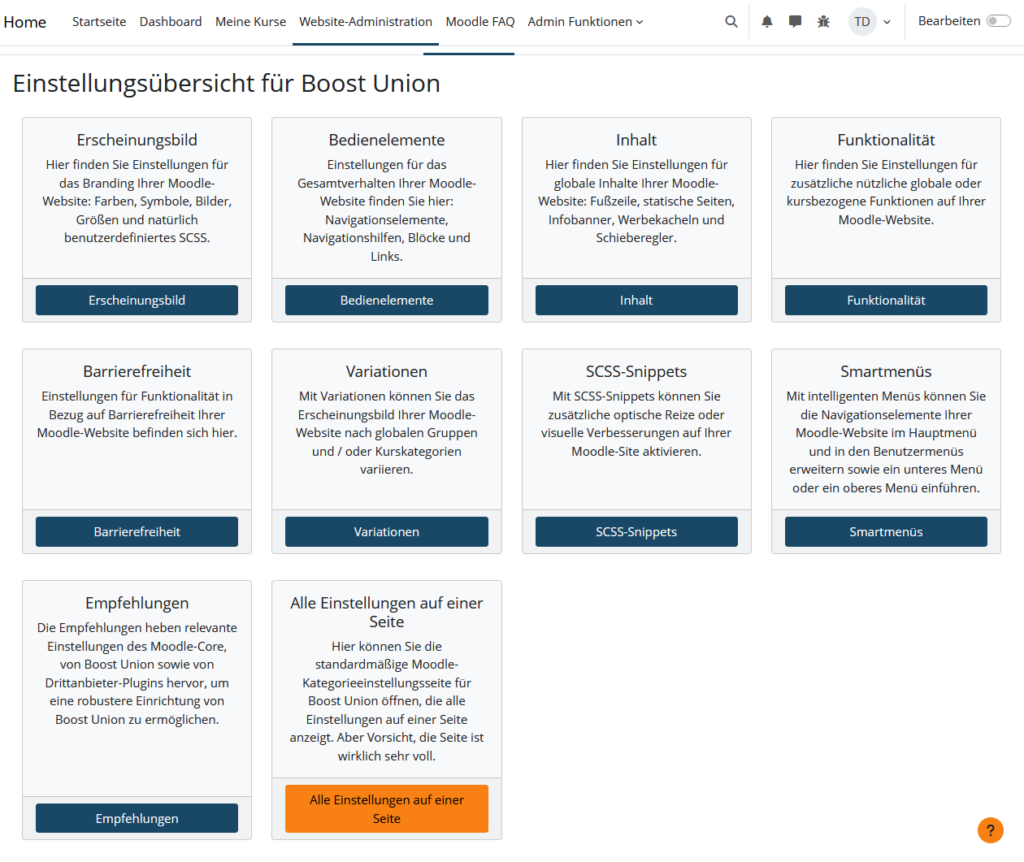
Customization options:
Customize your Moodle with Boost Union
A login page that fits your organization
The first impression of your Learning Management System
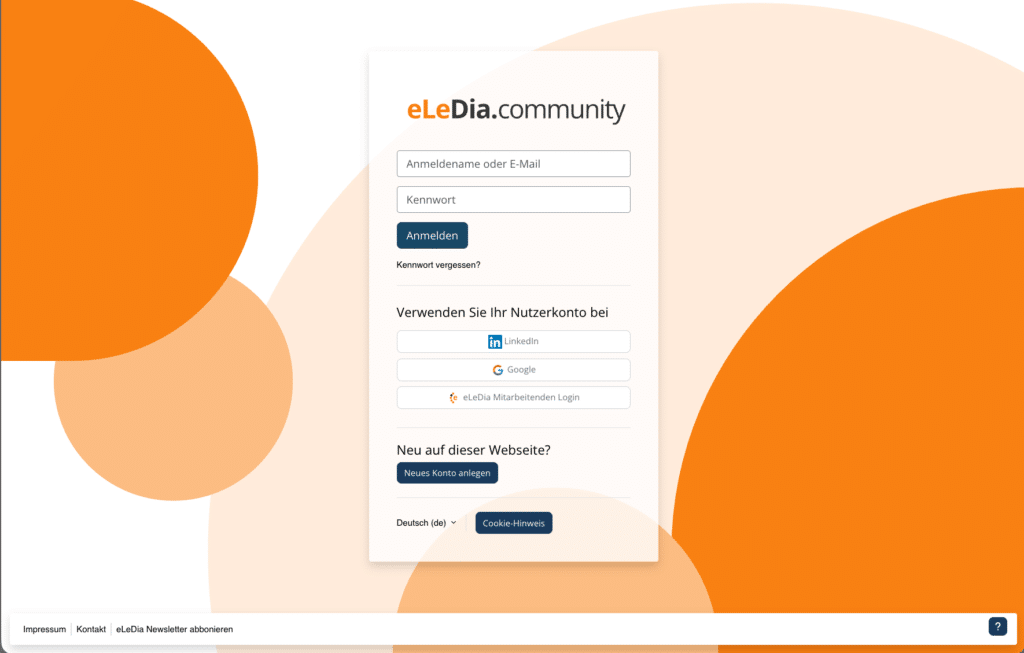
The login page is often the first point of contact with your Moodle system. Boost Union offers significantly more customization options than the default theme.
For example, you can:
- position the login form differently,
- set multiple background images,
- Add text and notes,
- Customize the logo and page title,
- organize various registration procedures,
- set the order of login options,
- clearly present different identity providers,
- Provide a separate login for local Moodle accounts.
Especially for Moodle systems that use single sign-on, Shibboleth, OpenID Connect, or multiple login methods, a clearly structured login page can significantly improve navigation.
Present Courses Clearly
More Guidance for Students
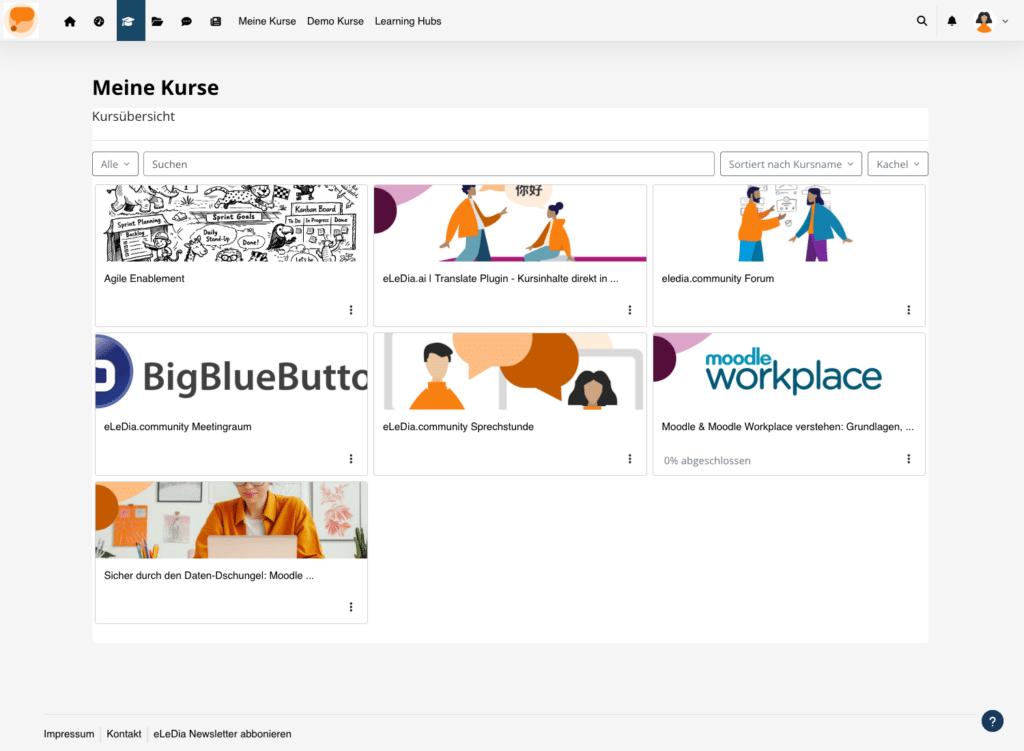
Boost Union enhances the display of courses and course categories. On the home page, in course categories, and in the "My Courses" section, content can be presented in a clearer and more visually appealing way.
Possible adjustments include:
- Course information presented as maps or concise lists
- Custom course images and alternate images
- Show or Hide Learning Progress
- Modernized presentation of course categories
- Expanded course headers with course images and metadata
- Additional category paths in the course header
- Activity Icons in the Course Index
- Customizable display and expandable sections of the course
This allows learners to identify, categorize, and access courses more quickly. At the same time, the familiar Moodle structure is preserved.
Navigation Tailored to Your Needs
Making Relevant Content More Accessible

With Boost Union's Smart Menus, you can create additional navigation elements and integrate them into various sections of Learning Management System . For example, menu items can be displayed in the main navigation, the user menu, or the mobile navigation.
Depending on the configuration, the following items, among others, can be integrated there:
- Internal and external pages
- Course Areas and Categories
- Frequently Used Features
- Profile Pages
- Support Services
- target audience-specific information
In addition, elements of the Moodle main navigation that are not needed can be hidden. If desired, favorite courses can be made accessible directly from the navigation bar. Boost Union can also add navigation between activities as well as a “Back to Top” function.
Display information where it's needed
Home Page, Notices, and Additional Content Sections
Boost Union offers various ways to display information prominently and in a structured manner in Moodle.
These include:
Information Banner Important announcements can be displayed on selected pages, such as notices regarding maintenance, new offers, or organizational changes.
Tiles on the Home Page
Offers, services, course categories, or current topics can be highlighted using customizable tiles.
Slider
Multiple pieces of content can be displayed as rotating elements on the Moodle homepage.
Additional pages—
—such as contact information, help, legal notices, special offers, or maintenance notices can be provided directly through the theme.
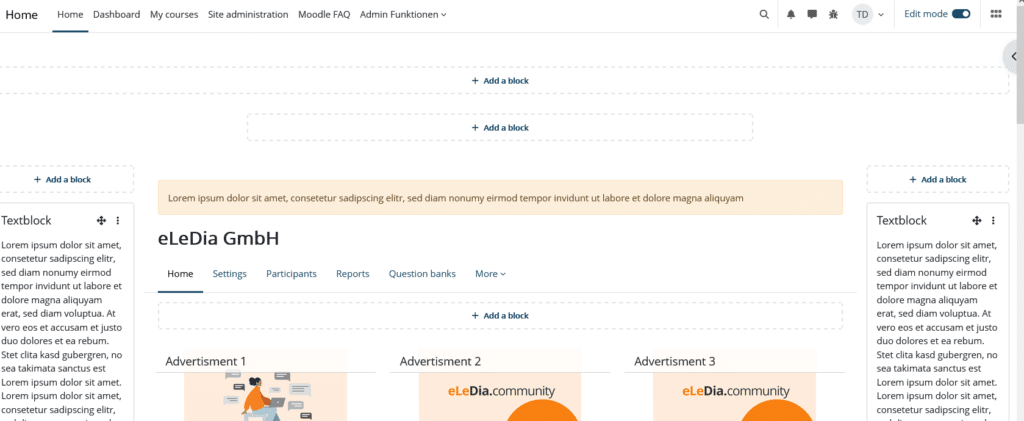
Additional Block Areas
Boost Union offers additional locations for Moodle blocks—including above and below the content, in the header, in the footer, or in an additional expandable area.
These areas become particularly flexible with Dash, a plugin from bdecent: pre-designed widgets or custom layouts as tiles, sliders, and tables that dynamically pull content from Moodle—from the course catalog to a personal learning overview.
A theme for different areas and target audiences
Using “Flavors” to Create Different Visual Styles
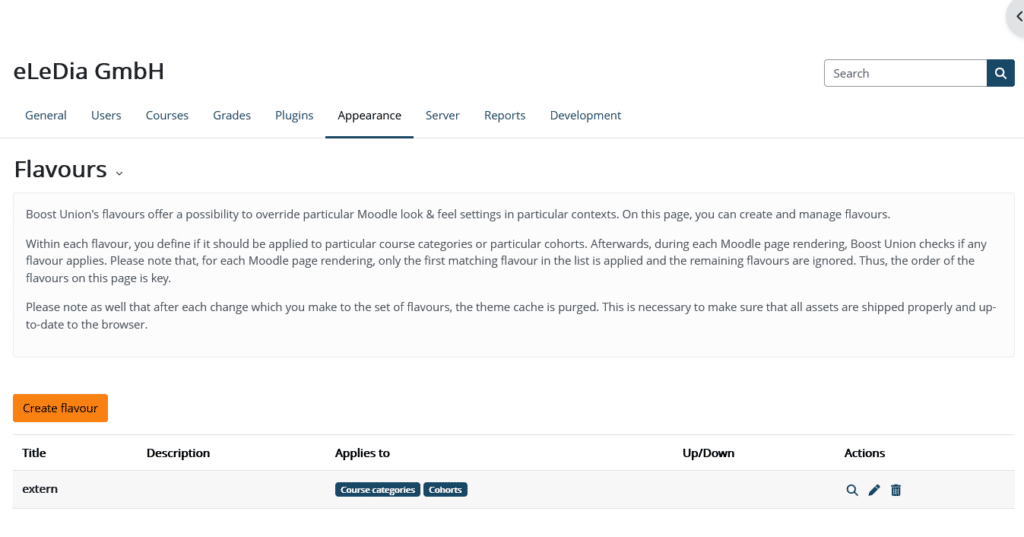
Not every section of a Learning Management System site has to look the same. Colleges, universities, companies, and educational organizations often operate multiple departments, brands, academies, or continuing education programs within a single Moodle installation.
Using what are known as "flavors," selected appearance settings can be overridden in specific contexts. This makes it possible, for example, to implement different brand colors or design elements for individual areas without having to run multiple completely separate Moodle systems.
For more advanced requirements, Boost Union can be extended through SCSS customizations or a custom grandchild theme. An official Boost Union child boilerplate is available as a technical foundation for this purpose.
Designing for Accessibility and User-Centricity
Good design supports all users.
A custom Moodle theme shouldn't just look good. It must organize content in a clear and understandable way, make it easier to navigate, and work on different devices.
In our design process, we take the following factors into account, among others:
- sufficient color contrast,
- clearly identifiable links and buttons,
- a clear visual hierarchy,
- intuitive navigation,
- responsive layout,
- Usability with different input devices,
- Consistent design of courses and activities.
Boost Union also offers options for providing an accessibility statement and a dedicated contact page for accessibility issues. However, the accessibility of a Learning Management System site always depends on the interaction between the Moodle version, theme configuration, plugins, and the learning content that has been set up.

From Configuration to a Custom Moodle Theme
We'll turn Boost Union into your theme
Boost Union offers many possibilities. However, it is crucial to develop a consistent and user-friendly overall concept from these options. Having too many features active at once can make the interface cluttered. That is why we consider design, navigation, and user guidance as a unified whole.
Analysis and Design
We'll review your existing Moodle installation, your corporate design guidelines, and the needs of your various target audiences. Together, we'll determine which Boost Union features would be most useful.
Technical Facilities
We will install the version of Boost Union that is compatible with your version of Moodle and initially configure the theme in a test or development environment.
Design in Line with the Corporate Identity
We implement colors, logos, fonts, and other design elements into Moodle. In doing so, we ensure a consistent look and feel across the navigation, courses, dashboard, and login area.
Custom Extensions
If the standard options aren't enough, we'll implement additional SCSS customizations or develop our own child theme based on Boost Union.
Quality Assurance and Rollout
Before going live, we test the theme on different screen sizes and in typical Moodle workflows. These include, for example, the login page, dashboard, course view, edit mode, and mobile view.
Documentation and Ongoing Support
You will receive clear documentation of the settings that have been configured. Upon request, we can handle updates, operations, support, and the ongoing development of your Moodle site.
Who is the Boost Union theme best suited for?
Boost Union is particularly well-suited for organizations that use Moodle professionally and need a custom look and feel, but at the same time want to stay as close as possible to the Moodle standard.
Typical applications include:
- Colleges and Universities and Research Institutions
- Schools and Educational Institutions
- Companies and Corporate Academies
- public institutions
- Associations and Nonprofit Organizations
- Continuing Education Providers
- Platforms with multiple business units or brands
Even when switching from an older custom theme, Boost Union can serve as a suitable foundation for consolidating customizations and improving long-term maintainability.
Why Boost Union?
Highly customizable
Many changes can be made through the Moodle administration interface without having to program every detail individually.
Close to the Moodle standard
Boost Union is based on Boost and only modifies the interface when specific functions are activated.
Modular design
You decide which features your Learning Management System actually needs.
Expandable
SCSS, CSS snippets, external stylesheets, and a custom child theme allow for more extensive customizations.
Open Source
The theme is available for free. There are no costs associated with the theme license itself, but there may be charges for consulting, design, setup, further development, and support.
FAQ – About the Boost Union Theme
What is Boost Union?
Boost Union is an enhanced child theme of the standard Moodle theme, Boost. It extends Boost with numerous configuration options and additional features for design, navigation, course presentation, and day-to-day Moodle operations.
What is the difference between Boost and Boost Union?
Boost is Moodle's default theme. Boost Union is based on Boost but offers significantly more customization options. These include, for example, custom brand colors, customized login pages, smart menus, advanced course layouts, additional block areas, and information banners.
Is Boost Union free?
Yes. Boost Union is freely available as an open-source plugin. There are no license fees for downloading or using it. Costs may be incurred for professional configuration, design, development, testing, hosting, or support.
Who created Boost Union, and who is continuing to develop it?
Boost Union is a collaborative project of the Moodle community: managed by Moodle an Hochschulen e.V., developed in cooperation with ssystems, bdecent and lern.link, and funded by several universities.
Can Boost Union be customized to match our corporate design?
Yes. Logos, colors, links, buttons, navigation, the login page, icons, and fonts can all be customized. For more advanced requirements, additional SCSS customizations or a custom child theme are possible.
Do we need programming skills for Boost Union?
Many customizations can be made directly through the Moodle administration interface. For more complex designs, custom components, or organization-specific features, knowledge of Moodle theme development, SCSS, and Mustache is helpful.
Can existing Moodle courses be reused?
Generally speaking, yes. A theme primarily changes the layout, not the actual course content. Before switching themes, however, you should test existing courses, plugins, special content formats, and customizations in a test environment.
Is Boost Union accessible?
Boost Union provides various features to support accessible design. However, a theme alone does not guarantee that Learning Management System is fully accessible. Color choices, configuration, plugins, embedded documents, and the design of course content are also critical factors.
For which versions of Moodle is Boost Union available?
Version-specific releases are provided for Boost Union. The Moodle Marketplace currently lists releases for Moodle 4.0 through Moodle 5.2. Before installation, we’ll check which version is compatible with your specific Moodle installation and the plugins you’re using.
Can Boost Union also be customized?
Yes. In addition to CSS and SCSS customizations, you can develop your own grandchild theme. This allows you to add custom features while continuing to use Boost Union as the technical foundation.



Subscribe to our newsletter now
Your e-mail address will only be used to send you our newsletter and information about our products and services. You can unsubscribe from our newsletter at any time using the unsubscribe link contained in every email.
Subscribe to our newsletter and receive regular information and exclusive offers on our products and services. We send out our newsletter about 4 to 6 times a year.
We use Brevo as our marketing platform. By submitting the form, you agree that the personal information you provide will be transferred to Brevo for processing in accordance with the privacy policy of Brevo.

Your trust, our responsibility
eLeDia is certified according to ISO/IEC 27001. This ensures that all areas - from hosting and individual development to support - meet the highest security standards. We guarantee the protection of sensitive data through external audits.