
vitero – The virtual space for interactive collaboration
Work together, even when you're physically apart: With Vitero, you can host virtual meetings, workshops, and coworking sessions. Interactive tools, flexible group rooms, and an intuitive work environment make online collaboration dynamic and productive.
Work together. Develop ideas.
Shape results.
Whether it’s a small project team, a facilitated workshop, or a spontaneous discussion: Vitero creates a virtual space where people don’t just talk to each other, but actively collaborate. Develop ideas, work on tasks, and exchange thoughts in small groups. The virtual work environment supports various forms of collaboration—from structured meetings to spontaneous coworking.
Here you will find the following topics
What is vitero?
vitero is a software solution for virtual collaboration and live communication. The solution was developed based on research conducted by the Fraunhofer Institute for Industrial Engineering (IAO) and features a unique virtual room layout: Instead of a traditional video conference, participants sit together at a virtual table.
There, they can present content, brainstorm ideas, draw together, vote, or work in smaller groups. The visual design is modeled after real-life meeting situations and makes it easier to navigate the virtual space.
vitero is ideal for companies, educational institutions, and organizations that want to make their digital collaboration more interactive.
vitero and Moodle – Collaborate Interactively, Seamlessly Connected
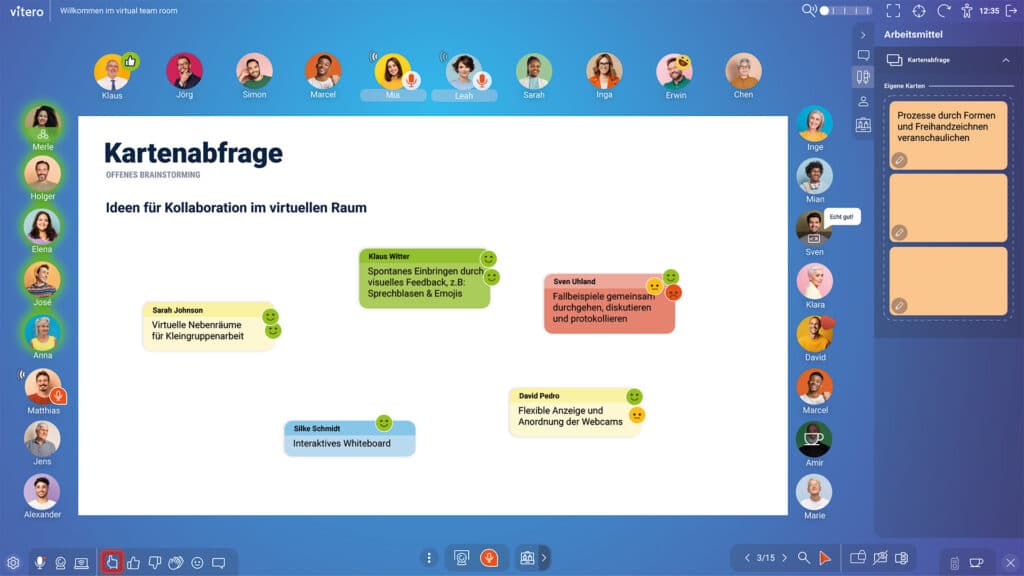
vitero creates virtual workspaces where people can develop ideas, work on tasks, and shape results together—even across geographical distances. Whether it’s moderated workshops, small-group work, or spontaneous coworking, the interactive features foster communication, strengthen team spirit, and bring digital collaboration to life.
When used in conjunction with Moodle, additional possibilities arise: While Moodle organizes learning content, courses, and learning processes, Vitero complements the " Learning Management System " by providing a space for synchronous collaboration. The two systems are connected via the Moodle connector.
eLeDia continues to develop the Moodle connector for vitero. Among other things, the interface supports direct access via single sign-on, the transfer of user and group information, and the management of vitero appointments directly from within Moodle. Course materials and attendance information can also be shared across systems.
Here’s how you can benefit from an integrated learning and work environment: Moodle serves as the foundation for your learning organization, while vitero facilitates collaboration in virtual teams. This streamlines administrative processes and creates more opportunities for exchange, interaction, and collaborative work.
Functions and Features of vitero
A virtual space for collaborative work
Vitero offers a variety of tools to make online events interactive and engaging.
Virtual Team Room
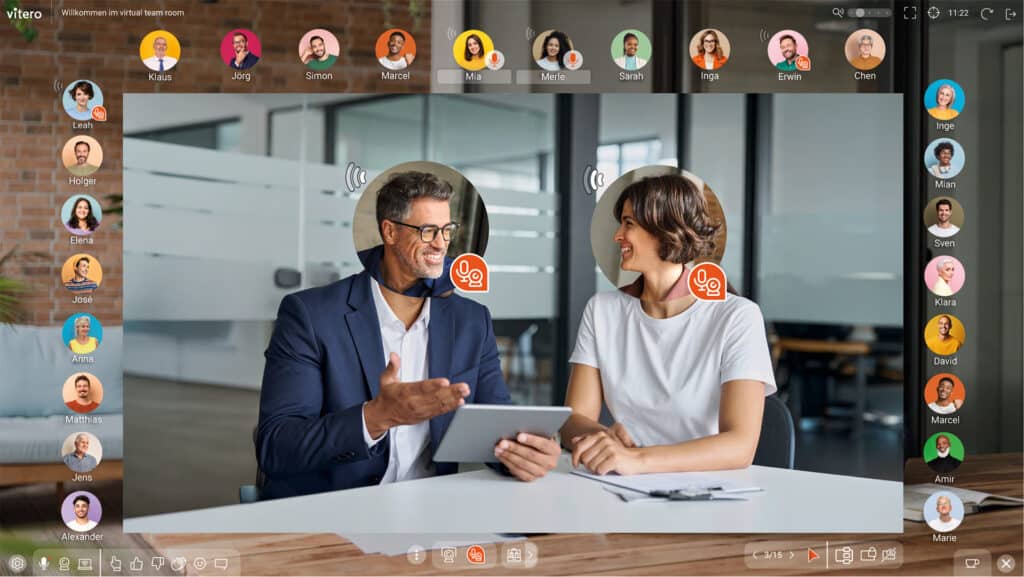
Participants meet as avatars at a shared virtual table. The familiar room layout makes it easier to find your way around and creates a shared work environment.
Interactive Collaboration
Using card sorting, sticky notes, drawing tools, and surveys, you can collaboratively collect, organize, and evaluate ideas and results.
Virtual Group Rooms
Spontaneously divide your participants into smaller groups. In the side rooms, they can discuss topics and work on assignments on their own. Afterward, everyone will reconvene in the main room.
Coworking and spontaneous exchanges
The Corporate Café provides virtual meeting places for informal interaction. Multiple virtual tables facilitate spontaneous encounters and conversations—much like in a shared office environment.
Shared presentation and workspace
Share screens, presentations, or videos. With the Collaboration Layer, participants can, for example, draw directly on shared content or add annotations.
Structured Facilitation
Microphone tokens allow you to grant speaking privileges in a targeted manner. This helps you maintain control even in larger groups and enables you to structure discussions and roundtable conversations.
Avatars and Spontaneous Feedback
Gestures, emojis, and speech bubbles allow for quick responses and make communication more lively.
Flexible Roles and Permissions
Functions and permissions can be assigned based on roles and delegated flexibly as needed. This allows participants to actively take on tasks.
Sharing Files and Content
Provide materials and enable file sharing directly within the virtual space.
Browser-based use
vitero can be used with modern web browsers. The user interface is designed to be largely consistent across different devices and operating systems.




vitero with eLeDia – the right solution for your collaboration
Would you like to make your online meetings more interactive or create virtual workspaces for your teams?
eLeDia helps you select and integrate the right digital solutions. Together, we’ll review your needs and determine how Vitero can effectively complement your collaboration and existing learning environment.
Whether it's virtual workshops, collaborative project work, or coworking: We'd be happy to advise you on the options available.
FAQ – Frequently Asked Questions About vitero
What is vitero?
vitero is software for virtual collaboration, online meetings, and interactive training sessions. Participants meet in a virtual room where they can work together, discuss topics, and review content.
Can I use vitero for coworking?
Yes. With Corporate Café, vitero offers virtual meeting places for spontaneous conversations and informal exchanges. Teams can meet at virtual tables and work together.
What options does vitero offer for group work?
vitero allows users to create virtual breakout rooms. There, participants can discuss topics, work on tasks, and develop results in smaller groups. Interactive tools such as maps, sticky notes, and drawing functions support collaboration.
Can I connect vitero to Moodle?
Yes. vitero offers interfaces and connectors for integration with learning management systems. Depending on the configuration, features such as single sign-on, user management, and role transfer are possible.
What is the difference between Vitero and BigBlueButton?
Both vitero and BigBlueButton enable interactive online events and collaborative group work. However, the two solutions have different focuses. vitero focuses on virtual workspaces, workshops, and coworking. BigBlueButton was developed specifically for digital learning and is particularly well-suited for online classes, webinars, and training sessions.
Both solutions can complement each other: BigBlueButton for digital teaching and vitero for interactive collaboration and working together.
When is vitero the right choice?
When people need to collaborate on tasks, develop ideas, and exchange thoughts informally online, Vitero provides the ideal work environment. The solution is particularly well-suited for small teams, project groups, workshops, and coworking scenarios.
When is BigBlueButton the right choice?
If you're looking for a solution for digital courses, online training, and webinars, BigBlueButton is a great choice. Its integration with Moodle allows for direct access from within the course. Features such as recordings, polls, and group rooms support the design of digital learning experiences.
Is vitero GDPR-compliant?
Vitero offers a GDPR-compliant SaaS solution with server locations in Germany, as well as an on-premises version. In addition to the provider, the specific configuration and the processing of personal data are also crucial for ensuring compliance with data protection regulations.
Do I need to install Vitero?
vitero can be used via a web browser. Participation generally does not require a traditional software installation on the user's device.
Element #9
Where Moodle connects with people and fosters meaningful interaction.
Subscribe to our newsletter now
Your e-mail address will only be used to send you our newsletter and information about our products and services. You can unsubscribe from our newsletter at any time using the unsubscribe link contained in every email.
Subscribe to our newsletter and receive regular information and exclusive offers on our products and services. We send out our newsletter about 4 to 6 times a year.
We use Brevo as our marketing platform. By submitting the form, you agree that the personal information you provide will be transferred to Brevo for processing in accordance with the privacy policy of Brevo.