Moodle App – Flexible Learning on Smartphones and Tablets
Today, learning takes place everywhere—at the office, on the go, while working from home, or right at the workplace. Mobile employees and students, in particular, need access to their learning materials at all times.
With the Moodle app, Moodle becomes a mobile Learning Management System. Courses, assignments, quizzes, and announcements are available on smartphones and tablets—and much of the content is even accessible offline. This keeps learning flexible, location-independent, and available at any time.
In this article, you'll learn about the features the Moodle app offers, the benefits it provides for businesses and educational institutions, and when it's particularly worthwhile to use it.
Topics in this post
- What is the Moodle app?
- Why Mobile Learning Is Becoming Increasingly Important
- The Most Important Features of the Moodle App
- Which Moodle activities are supported?
- Moodle app or browser?
- Differences Between the Free, Premium, and Branded Moodle Apps
- Conclusion
- Frequently Asked Questions (FAQ)
- Would you like to get the most out of the Moodle app?
What is the Moodle app?
Many people initially associate Moodle with a web-based Learning Management System. In fact, however, Moodle can also be used conveniently through the official Moodle app.
It was developed specifically for smartphones and tablets and provides mobile access to nearly all of the key features of a Moodle platform.
This allows learners to continue their professional development regardless of their work location—whether on a business trip, in the field, on campus, or working from home.
The app is available for both Android and iOS and is continuously being updated.
Why Mobile Learning Is Becoming Increasingly Important
Work and learning models have changed significantly in recent years. Today, for example, people learn while on the go, between appointments, on business trips, while working shifts, while working from home, or right at their workplace.
Learning Management System , therefore, must not only work on a desktop but also be easy to use on mobile devices. This is exactly where the Moodle app comes in.
The Most Important Features of the Moodle App
Open courses at any time
Through the app, students can access the courses they are enrolled in. The following content, among other things, is available:
- Learning Materials
- PDFs
- Books
- Text pages
- Files
- Videos (depending on the configuration)
- Learning Packages
- Quiz
The content is optimized for display on mobile devices.
Offline Learning
One of the most popular features is offline use.
Learners can download content and work on it later without an internet connection.
This is particularly well-suited for: air travel, train travel, field work, production areas, or locations with poor network coverage.
As soon as an Internet connection is reestablished, the Moodle app automatically syncs any changes.
Practical example
Before visiting a customer, a service technician downloads all the required safety training materials and goes through them during the train ride. Upon returning, progress is automatically synchronized.
Work on Assignments
The Moodle app supports a wide range of Moodle activities. Among other things, learners can complete typical Moodle tasks, such as uploading files, taking quizzes, using forums, responding to feedback, editing databases, using glossaries, and opening lessons.
This makes it possible to complete many courses entirely on a mobile device.
Push Notifications
The app automatically notifies you of important events.
Examples:
- Latest News
- Forum posts
- Deadlines
- Reviews
- Calendar Events
This helps students stay better informed and miss fewer deadlines.
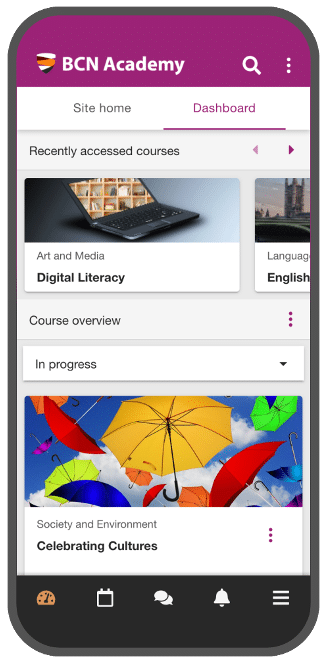
Personal Dashboard
The Moodle app's home screen displays all the important information at a glance.
These include, for example,
- Current Rates
- Progress
- Dates
- Announcements
- Most Recently Viewed Courses
This allows learners to access their most important learning content more quickly.
Which Moodle activities are supported?
One major advantage of the Moodle app is that it supports most of the standard activities.
These include, among other things:
| Activity | Support |
|---|---|
| Tasks | ✓ |
| Quiz | ✓ |
| Forum | ✓ |
| Feedback | ✓ |
| Glossary | ✓ |
| Database | ✓ |
| Lesson | ✓ |
| Book | ✓ |
| Text Page | ✓ |
| File | ✓ |
| URL | ✓ |
| Calendar | ✓ |
| H5P | ✓ |
| Learning Package (SCORM) | ✓ |
| Third-Party Plugins (Contributed Plugins) | X Specialized, non-standard third-party modules or plugins often do not have a built-in app interface |
Depending on the plugins or custom extensions used, additional features may be available, or certain activities may be subject to restrictions.
Moodle app or browser?
Both approaches have their merits.
| Moodle App | Browser |
|---|---|
| Optimized for smartphones | ideal for large screens |
| Offline Use | Internet required |
| Push Notifications | No native push notifications |
| Fast service | Full administration |
| Touch Controls | extensive settings |
For administrators, the browser is usually the first choice. For students, however, the Moodle app often offers greater ease of use.
Benefits for Businesses
Companies, in particular, benefit from mobile learning opportunities.
Typical applications include
- Onboarding New Employees
- Mandatory Training Sessions
- Product Training
- Sales Training
- Safety Training Sessions
- Compliance Training
- Continuing Education for Field Staff
The Moodle app makes it possible to integrate learning opportunities directly into your daily work routine.
Benefits for Colleges and Universities
Colleges and universities are also increasingly using Moodle on mobile devices.
Students can
- Download Lecture Materials
- Work on Assignments
- Track Submission Deadlines
- Participate in forum discussions
- View Reviews
- Receive notifications
This significantly improves accessibility, especially when learning takes place in different locations.
Requirements
To use this, you will need:
- a current Moodle installation
- Enabled Mobile Services
- a user account on the Moodle App Portal
- the official Moodle app
Additional features are available depending on the Moodle version. The Moodle app is regularly updated and adapted to new Moodle versions.
Differences Between the Moodle App Free (free), Moodle App Premium, and Branded Moodle App
Moodle App Free (free)
- Compatible with most self-hosted websites and websites managed by Moodle-certified partners
- 50 active devices for push notifications
- Access to 2 offline courses per device and location
- 1 custom menu item
- 1 disabled feature
- 10 custom pages
Moodle App Premium (€499/year)
- Compatible with most Moodle pages
- Unlimited active devices for push notifications
- Offline courses with unlimited access
- Unlimited custom app features
If your Moodle is hosted by an official Moodle partner such as eLeDia, the premium version of the app is already included in your hosting package.
About eLeDia's Hosting Packages
Branded Moodle App (Price upon request)
- Unlimited active devices for push notifications
- Offline courses with unlimited access
- Unlimited custom app features
- App available on the Apple Store and Google Play
- Complete App Branding
- Suitable for institutions with multiple locations
Overview of Features by Moodle App Type
| Features | Moodle App Free | Moodle App Premium | Branded Moodle App |
| Access to Course Content and Activities | ✓ | ✓ | ✓ |
| In-app messaging | ✓ | ✓ | ✓ |
| Calendar | ✓ | ✓ | ✓ |
| Music Book | ✓ | ✓ | ✓ |
| Multimedia Push Notifications | X | ✓ | ✓ |
| QR Login (requires Moodle LMS 3.9) | X | ✓ | ✓ |
| Easy Custom Branding | X | ✓ | ✓ |
| Custom site list in the Site Finder search results | X | ✓ | ✓ |
| Separate Notification Server | X | X | ✓ |
| Complete app branding (logo, colors) | X | X | ✓ |
| Google Analytics | X | X | ✓ |
| Mobile App Support via Email | X | X | ✓ |
| Biometric Login | X | ✓ | ✓ |
| Integration with Matomo Analytics | X | ✓ | ✓ |
Moodle video about the Moodle Branded App (multilingual)
Conclusion
The Moodle app enhances Moodle with a powerful mobile learning environment. Learners can access their courses at any time, view content offline, complete assignments, and receive push notifications.
The app offers greater flexibility and supports modern learning—regardless of location or device—especially for companies with mobile employees, as well as colleges and continuing education institutions.
Frequently Asked Questions (FAQ)
Is the Moodle app free?
Yes. The official Moodle app can be downloaded for free. Whether all features are available depends on the configuration of the specific Moodle platform.
Can I use Moodle even without an internet connection?
Yes. You can download a lot of content in advance and then edit it offline. As soon as you're back online, the app automatically syncs your changes.
Is there a Moodle app for Android and iPhone?
Yes. The Moodle app is available for both Android and iOS.
Can I submit assignments using the Moodle app?
Yes. Supported assignments can be completed and submitted directly in the app.
Does the Moodle app support push notifications?
Yes. The app can notify you about new messages, forum posts, deadlines, and other events.

Would you like to get the most out of the Moodle app?
Whether it's setup, configuration, or consulting regarding the Moodle Branded App—we'll help you seamlessly integrate the Moodle app into your Learning Management System . Contact us for a no-obligation consultation.